# Email widget
You can increase qualified traffic by recreating the widget interface in emails to give customers relevant activity suggestions.
For example, if your customer has just purchased a flight to Amsterdam, the confirmation email can include activities in Amsterdam that are available around their travel date. By creating dynamic content for your customers, you can engage them more easily.
## Embedding
While the redirect widget lets you embed a [custom script and container](/widgets/set-up), this will not work for emails. Instead, the *email widget* recreates the redirect widget's interface with URLs to fetch images and direct customers to a [white label solution](/white-label) or [musement.com](https://www.musement.com).
How you embed the widget images and activity URLs is up to you, but we recommend using either an image list or image map area.
### Image list
An image list displays each activity as an image thumbnail:
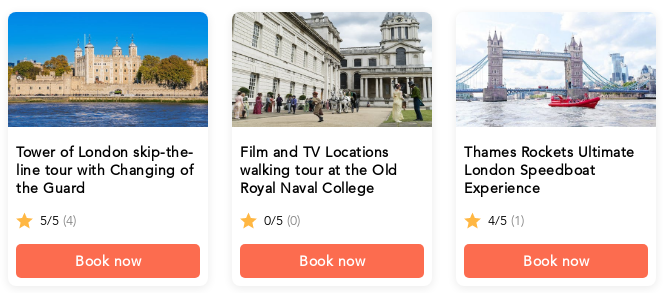
To achieve this effect, wrap each image inside an anchor:
```html


 ```
The image list solution is responsive and fully supported on mobile devices.
### Image map area
An [image map area](https://developer.mozilla.org/en-US/docs/Web/HTML/Element/area) is another method for displaying activities. Instead of fetching an image for each activity, you fetch a single image with all the activities:
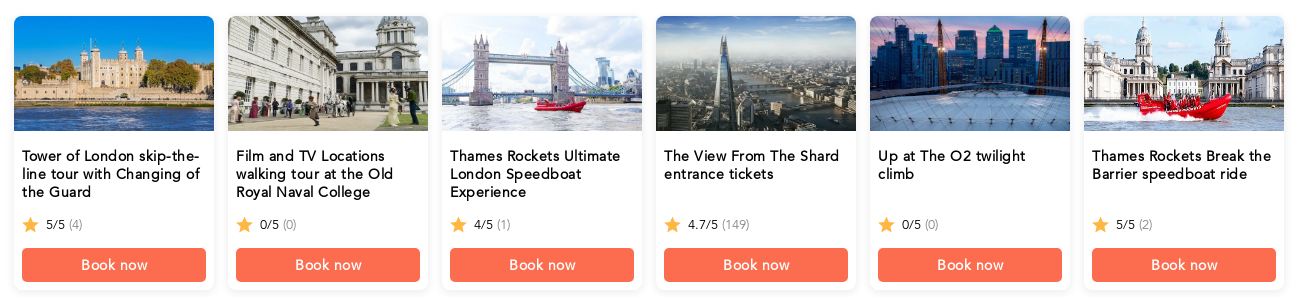
Each area of the image can be associated with a different activity:
```html
```
In the example above, we have wrapped the image map area in a table element. We strongly recommend this practice to avoid issues caused by autoscaling in some email clients.
## Widget image
The email widget generates images for each activity which replicate the redirect widget interface. A single activity image contains:
* Activity cover image
* Activity title
* Activity rating
* Number of reviews for the activity
* Call-to-action booking button
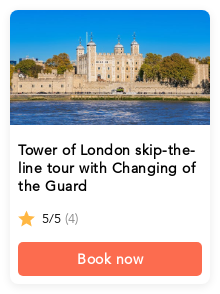
Widget images are available at the `/email-widget/activities.png` endpoint. Your query parameters must specify a destination and the number of elements to fetch.
If you want to create a banner with multiple activities, set `number_of_elements` to a value greater than one.
To fetch a single activity image, use `number_of_elements=1` and the `position` parameter equal to the activity's position in the list.
A widget image for a single activity is 220 x 294 pixels. Every additional activity adds 4 pixels between each image.
## Configuration
Each activity and image for the email widget is configured with query parameters.
The table below lists all available parameters for the email widget:
| Parameter | Required | Purpose | Example value |
| --- | --- | --- | --- |
| `domain` | No | Override the default URL domain | `www.musement.com` |
| `city` | Yes* | Fetch activities in a specific destination | `New York` |
| `latitude` | Yes* | Fetch activities near a specific latitude | `45.466667` |
| `longitude` | Yes* | Fetch activities near a specific longitude | `9.183333` |
| `distance` | No | Fetch activities located within the specified search radius | `5KM` |
| `from` | No | Fetch activities available from the specified date | `2022-01-01` |
| `to` | No | Fetch activities available before the specified date | `2022-01-15` |
| `market_prefix` | No | Use a specific market | `us` |
| `number_of_elements` | Yes | The maximum number of activities to fetch | `5` |
| `pass_through_params` | No | Add query parameters to pass through to the activity page | `{'{'}"aid":"example-id-123"}` |
| `position` | No | Fetch a single activity that appears in the specified position | `1` |
| `show_price` | No | Control whether the price is displayed | `true` |
| `cid` | No | Tag traffic with a channel ID | `widget_cid` |
| `utm_campaign` | No | Tag traffic campaign | `summer-promo` |
| `utm_medium` | No | Tag traffic device | `email-widget` |
| `utm_source` | No | Tag traffic source | `your-site.com` |
** A widget must be set for a single destination, but there are multiple ways to configure it. See the [Destination section](/widgets/email-widget#destination) for more info.*
### Domain
The domain determines the widget style, default market, language and currency. It also handles redirections to the correct activity page when a user selects an activity in the email.
Partners using a white label solution should use the [same domain](/white-label/domain) for any email widget URLs. Partners without a white label solution should use `https://whitelabel-frontend.prod.musement.com` as their domain.
It is also possible to override the default domain using the `domain` parameter:
```
{'{'}baseUrl}/email-widget/activities?number_of_elements=1&city=London&position=1&domain=www.musement.com
```
### Destination
The query parameters must contain a specific destination to fetch activities in an area. There are two ways to define the location. Your configuration must contain exactly one of the following:
* City
* Coordinates
#### City
If you provide the widget with the name of a city via the `city` parameter, it will fetch activities which belong to the city in our database which best matches the parameter value.
By default, the widget assumes the city name is either in English or the default language for your domain configuration. Using city names in a different language from the configuration can lead to empty results.
When using the `market_prefix` parameter, you can use the city name either in English or in the language associated with the market:
**London, Italian market**
* `city=London&market_prefix=it`
* `city=Londra&market_prefix=it`
**Munich, German market**
* `city=Munich&market_prefix=de`
* `city=M%C3%BCnchen&market=de`
Not all destinations in our database contain translations. For this reason, we strongly encourage to always use the English name of the city, regardless of whether the `market_prefix` is specified or not.
#### Coordinates
Using a city name can be inaccurate. Giving the widget a set of coordinates allows it to fetch activities within 100 km of the specified location. When defining a location via coordinates, both the `latitude` and `longitude` parameters are required. Omitting either parameter, or using invalid decimal values, will result in an error.
#### Distance
When searching for activities by coordinates, results are located within a 100 km radius by default. You can override this default using the `distance` parameter. The parameter must contain a positive integer value and one of the following units of measure:
* `KM`: kilometers
* `M`: miles
For example, to search for activities located 5 km within the coordinates, set the `distance` parameter to `5KM`.
### Date range
Similar to the [date filters for the redirect widget](/widgets/configuration#date-range), you can limit fetched activities to those with availability between a specified date range by using the `from` and `to` parameters. These parameters must contain values in the `yyyy-mm-dd` format and they must be used together. It is currently not possible to use only one of the date range parameters.
### Market prefix
The market prefix sets the widget's entire *market*: the currency and catalog of activities to fetch as well as translations. You can specify the market prefix with the `market_prefix` parameter.
The market prefix is optional. The domain's default market prefix is used whenever the parameter is absent, contains an invalid value or uses a value that has not been enabled for you.
### Number of elements
The `number_of_elements` parameter affects the maximum number of activities you can fetch. This parameter is required and accepts values from 1 to 20. See the [widget image section](/widgets/email-widget#widget-image) for more info.
### Query parameters
The optional `pass_through_params` parameter allows you to add additional query parameters which are passed through to the resulting activity page. The attribute value must be a serialized JSON object with key-value pairs. Parameters which are already present in the configuration will be omitted in the resulting URL. Due to the nature of the serialized data, partners are encouraged to take appropriate steps to properly encode the attribute value.
For example, take the generic object below:
```json
{
"aid": "example-id-123"
}
```
Serializing the object, we get:
```
{'{'}"aid":"example-id-123"}
```
Next, we encode the serialized object so that it can be used in a query:
```
%7B"aid"%3A"example-id-123"%7D
```
Finally, we add the query parameter to the widget URL:
```
{'{'}baseUrl}/email-widget/activities?number_of_elements=1&city=London&position=1&pass_through_params=%7B%22aid%22%3A%22example-id-123%22%7D'
```
Partners who do not have their own white label domain must include their affiliate ID via the `pass_through_params` parameter as the property `aid`. This ID is issued at the beginning of the development process.
### Show price
By default, the price of an activity is not present in the activity image. You can change this by adding `show_price=true` to the URL's query parameters.
The price will be displayed in the currency for the market associated with the request.
### Tagging traffic
You can better understand the email widget's performance by tagging traffic with specific parameters. When customers select an activity from the email, this information is recorded.
The widget currently supports the following parameters:
| Parameter | Default value |
| --- | --- |
| `cid` | `email_widget_cid` |
| `utm_campaign` | `email_widget` |
| `utm_medium` | `email_widget` |
| `utm_source` | `email_widget_{'{'}position}_{'{'}coordinates}` OR `email_widget_{'{'}position}_{'{'}city}` |
For more information on each parameter, check out the [dedicated white label section](/white-label/tracking). Please note that the default values for the `utm_source` parameter will vary:
* `position`: The position of the element selected by the customer
* `coordinates`: The configuration's [latitude and longitude](#coordinates) (if present)
* `city`: The configuration's [city name](#city) (if present)
Tagging traffic is optional. The widget will fall back to default values when these parameters are absent. When partners use these parameters, the prefix `email_widget_` will be automatically added in reports to help differentiate widget traffic from other channels.
```
The image list solution is responsive and fully supported on mobile devices.
### Image map area
An [image map area](https://developer.mozilla.org/en-US/docs/Web/HTML/Element/area) is another method for displaying activities. Instead of fetching an image for each activity, you fetch a single image with all the activities:

Each area of the image can be associated with a different activity:
```html
```
In the example above, we have wrapped the image map area in a table element. We strongly recommend this practice to avoid issues caused by autoscaling in some email clients.
## Widget image
The email widget generates images for each activity which replicate the redirect widget interface. A single activity image contains:
* Activity cover image
* Activity title
* Activity rating
* Number of reviews for the activity
* Call-to-action booking button

Widget images are available at the `/email-widget/activities.png` endpoint. Your query parameters must specify a destination and the number of elements to fetch.
If you want to create a banner with multiple activities, set `number_of_elements` to a value greater than one.
To fetch a single activity image, use `number_of_elements=1` and the `position` parameter equal to the activity's position in the list.
A widget image for a single activity is 220 x 294 pixels. Every additional activity adds 4 pixels between each image.
## Configuration
Each activity and image for the email widget is configured with query parameters.
The table below lists all available parameters for the email widget:
| Parameter | Required | Purpose | Example value |
| --- | --- | --- | --- |
| `domain` | No | Override the default URL domain | `www.musement.com` |
| `city` | Yes* | Fetch activities in a specific destination | `New York` |
| `latitude` | Yes* | Fetch activities near a specific latitude | `45.466667` |
| `longitude` | Yes* | Fetch activities near a specific longitude | `9.183333` |
| `distance` | No | Fetch activities located within the specified search radius | `5KM` |
| `from` | No | Fetch activities available from the specified date | `2022-01-01` |
| `to` | No | Fetch activities available before the specified date | `2022-01-15` |
| `market_prefix` | No | Use a specific market | `us` |
| `number_of_elements` | Yes | The maximum number of activities to fetch | `5` |
| `pass_through_params` | No | Add query parameters to pass through to the activity page | `{'{'}"aid":"example-id-123"}` |
| `position` | No | Fetch a single activity that appears in the specified position | `1` |
| `show_price` | No | Control whether the price is displayed | `true` |
| `cid` | No | Tag traffic with a channel ID | `widget_cid` |
| `utm_campaign` | No | Tag traffic campaign | `summer-promo` |
| `utm_medium` | No | Tag traffic device | `email-widget` |
| `utm_source` | No | Tag traffic source | `your-site.com` |
** A widget must be set for a single destination, but there are multiple ways to configure it. See the [Destination section](/widgets/email-widget#destination) for more info.*
### Domain
The domain determines the widget style, default market, language and currency. It also handles redirections to the correct activity page when a user selects an activity in the email.
Partners using a white label solution should use the [same domain](/white-label/domain) for any email widget URLs. Partners without a white label solution should use `https://whitelabel-frontend.prod.musement.com` as their domain.
It is also possible to override the default domain using the `domain` parameter:
```
{'{'}baseUrl}/email-widget/activities?number_of_elements=1&city=London&position=1&domain=www.musement.com
```
### Destination
The query parameters must contain a specific destination to fetch activities in an area. There are two ways to define the location. Your configuration must contain exactly one of the following:
* City
* Coordinates
#### City
If you provide the widget with the name of a city via the `city` parameter, it will fetch activities which belong to the city in our database which best matches the parameter value.
By default, the widget assumes the city name is either in English or the default language for your domain configuration. Using city names in a different language from the configuration can lead to empty results.
When using the `market_prefix` parameter, you can use the city name either in English or in the language associated with the market:
**London, Italian market**
* `city=London&market_prefix=it`
* `city=Londra&market_prefix=it`
**Munich, German market**
* `city=Munich&market_prefix=de`
* `city=M%C3%BCnchen&market=de`
Not all destinations in our database contain translations. For this reason, we strongly encourage to always use the English name of the city, regardless of whether the `market_prefix` is specified or not.
#### Coordinates
Using a city name can be inaccurate. Giving the widget a set of coordinates allows it to fetch activities within 100 km of the specified location. When defining a location via coordinates, both the `latitude` and `longitude` parameters are required. Omitting either parameter, or using invalid decimal values, will result in an error.
#### Distance
When searching for activities by coordinates, results are located within a 100 km radius by default. You can override this default using the `distance` parameter. The parameter must contain a positive integer value and one of the following units of measure:
* `KM`: kilometers
* `M`: miles
For example, to search for activities located 5 km within the coordinates, set the `distance` parameter to `5KM`.
### Date range
Similar to the [date filters for the redirect widget](/widgets/configuration#date-range), you can limit fetched activities to those with availability between a specified date range by using the `from` and `to` parameters. These parameters must contain values in the `yyyy-mm-dd` format and they must be used together. It is currently not possible to use only one of the date range parameters.
### Market prefix
The market prefix sets the widget's entire *market*: the currency and catalog of activities to fetch as well as translations. You can specify the market prefix with the `market_prefix` parameter.
The market prefix is optional. The domain's default market prefix is used whenever the parameter is absent, contains an invalid value or uses a value that has not been enabled for you.
### Number of elements
The `number_of_elements` parameter affects the maximum number of activities you can fetch. This parameter is required and accepts values from 1 to 20. See the [widget image section](/widgets/email-widget#widget-image) for more info.
### Query parameters
The optional `pass_through_params` parameter allows you to add additional query parameters which are passed through to the resulting activity page. The attribute value must be a serialized JSON object with key-value pairs. Parameters which are already present in the configuration will be omitted in the resulting URL. Due to the nature of the serialized data, partners are encouraged to take appropriate steps to properly encode the attribute value.
For example, take the generic object below:
```json
{
"aid": "example-id-123"
}
```
Serializing the object, we get:
```
{'{'}"aid":"example-id-123"}
```
Next, we encode the serialized object so that it can be used in a query:
```
%7B"aid"%3A"example-id-123"%7D
```
Finally, we add the query parameter to the widget URL:
```
{'{'}baseUrl}/email-widget/activities?number_of_elements=1&city=London&position=1&pass_through_params=%7B%22aid%22%3A%22example-id-123%22%7D'
```
Partners who do not have their own white label domain must include their affiliate ID via the `pass_through_params` parameter as the property `aid`. This ID is issued at the beginning of the development process.
### Show price
By default, the price of an activity is not present in the activity image. You can change this by adding `show_price=true` to the URL's query parameters.
The price will be displayed in the currency for the market associated with the request.
### Tagging traffic
You can better understand the email widget's performance by tagging traffic with specific parameters. When customers select an activity from the email, this information is recorded.
The widget currently supports the following parameters:
| Parameter | Default value |
| --- | --- |
| `cid` | `email_widget_cid` |
| `utm_campaign` | `email_widget` |
| `utm_medium` | `email_widget` |
| `utm_source` | `email_widget_{'{'}position}_{'{'}coordinates}` OR `email_widget_{'{'}position}_{'{'}city}` |
For more information on each parameter, check out the [dedicated white label section](/white-label/tracking). Please note that the default values for the `utm_source` parameter will vary:
* `position`: The position of the element selected by the customer
* `coordinates`: The configuration's [latitude and longitude](#coordinates) (if present)
* `city`: The configuration's [city name](#city) (if present)
Tagging traffic is optional. The widget will fall back to default values when these parameters are absent. When partners use these parameters, the prefix `email_widget_` will be automatically added in reports to help differentiate widget traffic from other channels.